Showing posts with label 5. Show all posts

Friday, September 20, 2013

0 Comments
Posted in Arrangement, Art, Business

5 Useful iTunes Tips 11 The Mandatory Controlled

5 Useful iTunes Tips 11 The Mandatory Controlled - Thoroughly enjoyable week. In addition to using iTunes 11, we are now able to purchase music on the iTunes Store Indonesia. Initially I wanted to gather some tips about iTunes 11 and distributed to readers, but it seems to Cult of Mac managed to create a collection of tips iTunes 11 is much more complete.

I was so full of helpful tips are shared, I do not even know where to begin to learn that first. Therefore, I would choose the tips that must be noted when using the new iTunes 11.
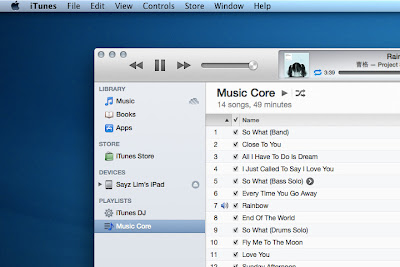

Bring up the Sidebar


Sidebar is a relic of the iTunes 10 and prior to abandonment (also called relics). If you still want the sidebar back in iTunes 11, then do I just press Command + Option + S or choose View> Show Sidebar from the menu bar.
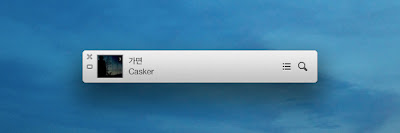
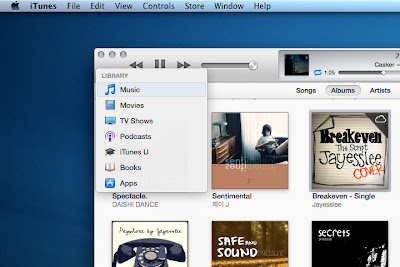
Bring up MiniPlayer  


There are 2 ways to bring MiniPlayer:
 
The first is to change the look of iTunes into MiniPlayer by selecting the button in the upper right (Command + Option + M).

 The second is to raise MiniPlayer alongside iTunes by selecting Window> MiniPlayer or press (Command + Option +3). 

Switching Between Media


Without enable the sidebar, switching between media will require a lot of clicks. Therefore, the iTunes 11 provides a shortcut to switch between media that is Command + [1-7] in the following order: Music, Movies, TV Shows, Podcasts, iTunes U, Books, and Apps.


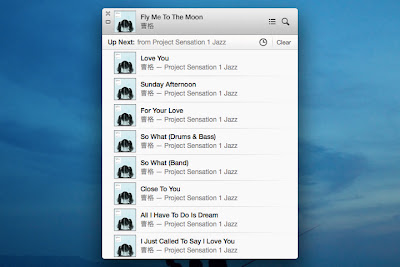
Controlling Songs By Up Next

Up Next allows you to add songs to the play list without overwriting the songs being played. Say youre playing the playlist Classical, and suddenly want to listen to another song. Simply add the songs to Up Next and when they finish playing, Classical playlist will play again. 


You can bring up Next by pressing Command + Option + U either in iTunes or in a state MiniPlayer. Then, to add songs to Up Next in several ways, namely:
  • Drag and Drop one or more songs to the panel Up Next at the top center.
  • Through action arrow and select Play Next or Add to Up Next. You can also choose the plus button that can be displayed by holding Option.
  • Use a shortcut to add songs to the list. Select the desired song from the list and press Option + Return. 

Hiding Media iCloud


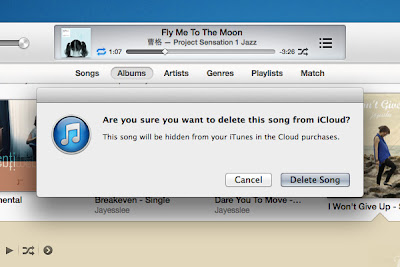
If you are shopping at the iTunes Store, especially those abroad, the iTunes library you must be filled with songs iCloud. All that can be downloaded or played directly from within iTunes. What about the song that does not want to appear? You hide them.

  • The simplest way is to hide everything after you download the songs you want. Choose View> Hide Music in the Cloud.
  • Another way is to hide the songs one by one. This step is useful if you want to retain some of the songs in the library but do not want to download it. Choose a song that has the symbol of the clouds, and then delete to hide it from the libray.
Note: Restoring the song that has been hidden can be done through the iTunes Store> Accounts> View Hidden Purchases.

Such tips that need to be mastered to start using iTunes 11. And the last trick that I often use is Command + L to move to the song being played. Please try.

Wednesday, August 14, 2013

0 Comments
Posted in Arrangement, Art, Business

Cross Andromeda A18 Price Specs Android Phone Dual SIM 3 5 Inch Screen There is Wi Fi 3 2MP Camera


Cross Andromeda A18 Price Specs, Android Phone Dual SIM 3.5 Inch Screen There is Wi-Fi 3.2MP Camera - Many local vendors as well as the world compete to create a product of the latest smartphone with android OS, but does not leave the price of inaccessibility. Some time ago Cross has also introduced two other Android phones Andromeda Andromeda A20 and A25 which is a mobile phone at designated for the middle to lower as well. To find out about the price and specifications Andromeda A18 Cross this then check out the information below carefully.


Complete Specifications Cross Andromeda A18
- Android 2.3.6 Gingerbread.
- 3G / HSDPA Data Connection + WiFi + Dual GSM + GPS.
- LCD 3.5 inch HVGA 480 x 320 Pixels.
- Capacitive Multi-Touch.
- 3.2 mega Pixels Camera + Rear Flash Light.
- 1.3 Mega Pixels Front Camera.
- 1GHz CPU, 256 MB ROM, 512 MB RAM. Micro SD up to 32 GB.
- MP3 / MP4 / 3GP / FM Radio / Audio Video Recording.
- WAP / GPRS / Wifi / Modem / Bluetooth.
- Support Video Chat. GPS / Compass / Proximity Sensor / 3D Gravity Sensor.
- USB Tethering & Portable Wifi Hot Spot.Youtube, Push Email, Maps.
- Compatible HF USB and 3.5 mm.
Cross Andromeda A18 Price Latest USD 80.

Cross A18 has a screen measuring about 3.5 inches, TFT Capacitive Touchscreen HVGA (480 × 320 pixels) multi-touch. Which is the same screen of the phone Cross at designated Andromeda 25 and for the operating system is no different with my other friends who are still carrying the Android 2.3 Gingerbread with a processor that is in use is 1GHz. Cross andromeda A18 has an internal memory of 256 MB ROM, 512 MB RAM, and if in a sense less qualified can add additional external memory Micro SD up to 32 GB that will surely be able to provide enough space for your important data and files. Seems less cool if the phone does not have a camera, the main camera on the A18 was pinned in the andromeda at 3.2MP plus flash light and a 1.3 megapixel secondary camera.

Other features are MP3 / MP4 / 3GP / FM Radio / Audio Video Recording. WAP / GPRS / Wifi / Modem / Bluetooth. Support Video Chat. GPS / Compass / Proximity Sensor / 3D Gravity Sensor. USB Tethering & Portable Wifi Hot Spot.Youtube, Push Email, Maps. HF Compatible USB and 3.5 mm.

Wednesday, June 5, 2013

0 Comments
Posted in Arrangement, Art, Business

Sony Xperia Z Phablet Luxury Android Sony Screen 5 Inches With Quad Core Processor 12MP Camera


Sony Xperia Z, Phablet Luxury Android Sony Screen 5 Inches With Quad Core Processor 12MP Camera.
A rumor and supported by leaks from several leading online media that Sony is developing an android smartphone with 5-inch screen that uses the android jelly bean in support with quad-core processor Qualcomm Snapdragon S4 1.5 GHz speed with 4G LTE support, combined with 2 GB of RAM. In view of the terms of design, the Sony Xperia Z has a luxurious design with a bandage body stylist create a luxurious feel to the latest android smartphone from Sony is. Price is on offer by some online media that admins find that the price of the Sony Xperia Z stood at around $ 655.


Specifications that the operating system Android OS Jelly Bean and Sony Xperia Z is the screen size of 5 inches equipped with an image resolution of 1920 x 1080 pixels (443 ppi). This smartphone using Qualcomm APQ8064 Snapdragon chipset S4 Pro with quad-core processor (up to 1.7 GHz) and the GPU Adreno 320. Meanwhile, memory capacity is 2 GB.
Its features include a camera which is embedded in a mobile phone is the sony has a 12MP main camera which is believed to have the ability to be better than 13 MP camera that certainly belongs Xperia T will be an advanced one plus the value of the new product. Currently circulating news is that the Sony Xperia Z will go on sale in the region of Thailand on Thai Bath 19,990 price range (without a contract), or about $ 655. This price can be higher or lower depending on the sales area.

Tuesday, June 4, 2013

0 Comments
Posted in Arrangement, Art, Business

iPhone 5 release date news and rumours


As it happened, there was no iPhone 5 in 2011 after all, but the company did announce the iPhone 4S.
However, the new iPhone 5 is still on the cards - were expecting it to debut in the middle of this year. So weve gathered together all the latest iPhone 5 rumours and rounded them up below.

First though, why not read our complete iPhone 4S review?
Its the phone that appeared when the whole world was looking forward to the iPhone 5 anyway, so make up your own mind whether to make the jump to Apples latest now or save those pennies for the 2012 iPhone 5 release.

iPhone 5 release date

iPhone 5 news
iPhone 5 news
Stay up to date on iPhone 5 with our in-depth coverage
Given the pattern of Apples iPhone launches, were expecting the next-gen iPhone 5 to debut in mid to late 2012. We reckon its most likely to be shown off at Apples Worldwide Developer Event (WWDC), which usually takes place in early June.
Rumours that we reported on 18 October claim an iPhone 5 release date of Summer 2012. Analyst Ashok Kumar claimed that the absent iPhone 5 was meant to be the big announcement at the recent event where the iPhone 4Swas launched.
We also reported in February that the new iPhone would be launched in October, falling into line with the same release schedule from last year, and Macotakara sources confirming the Cupertino brand would be honouring the same upgrade cycle from now on.

iPhone 5 form factor

iPhone 5 RSS feed
Subscribe to our iPhone 5 RSS feed
Constant alerts on the latest iPhone 5 news
Unlike the iPhone 4S, the new iPhone will be a completely new design from what has gone before, so that means an entirely new casing as we saw with the iPhone 3G and, later, the iPhone 4.
Interestingly, someone who claimed to have seen a larger-screened iPhone 5 prototype said in November 2011 that Steve Jobs canned the new handset and opted for the iPhone 4S because of the larger screen size of the new device. According to Business Insider, it was feared that a new size would create a two-tier iPhone ecosystem.
Beatweek also claimed in November 2011 that the 5-inch was scrapped "because Apple wouldnt be able to do it properly" this year. However, theDaily Mail (make of that what you will) then suggested that a four-inch version was likely and that Sony has already shipped top secret demo screens to Apple.

iPhone 5 specs

Based on the roadmap of mobile chip design specialist ARM (of which Apple is a licensee), well see a quad-core processor debut in the new iPhone 5 - probably called the Apple A6. We know that well see other quad core handsets debut in 2012, so its not too much of a stretch to say that the iPhone 5 will be the same.
We had expected some kind of help in terms of predicting the iPhone 5 CPU from the launch of the new iPad, but the announcement of a slightly tweaked A5X processor really didnt help things there.

iPhone 5 will have 4G/LTE support

With many 4G handsets already announced in the US, it cant be long before the iPhone supports 4G technologies - even if we wont even have a UK spectrum auction until 2012.
  • 4G mobile broadband and LTE explained
Cnet.com quotes Will Strauss from analyst firm Forward Concepts, who says that the next iPhone will feature LTE technologies."Theyre saving iPhone 5 for the LTE version and that wont be out until next spring," said Strauss.
After the new iPads launch brought 4G to an Apple device, its widely expected that 4G will come to iPhone 5.

Steve Jobs iPhone 5 legacy

Many sites have reported that Steve Jobs was working hard on the iPhone 5 project, which will apparently be a "radical redesign". We shall see... but the fact the iPhone 4S was so similar to the iPhone 4 suggests that Steve was working on something pretty special before
And if youre in a bit of a hurry, weve also got a handy iPhone 5 video detailing the latest rumours on release date, spec and more - so check if out for a quick fix of next-gen Apple fun:
The Wall Street Journal has previously reported that: "Apple is also developing a new iPhone model, said people briefed on the phone. One person familiar said the fifth-generation iPhone would be a different form factor than those that are currently available… it was unclear how soon that version would be available to Verizon or other carriers."
This has since been backed up by reports from Engadget, which state the design will be a total rethink.

iPhone 5 screen

Various sources claim the iPhone 5 will feature a larger, 4-inch screen. Digitimes quotes the source as saying that Apple is expanding the screen size "to support the tablet PC market as the vendor only has a 9.7-inch iPad in the market."
On 23 May 2011, we reported on rumours that the iPhone 5 could feature a curved glass screen. These rumours also came from Digitimes, which said that Apple has purchased between 200 and 300 special glass cutting machines because theyre too costly for the manufacturers to invest in.
In March 2012, new reports suggested that the new iPhone 5 would come sporting a larger 4.6-inch retina display.

iPhone 5 digital wallet - NFC

Review
iPhone 4S review
iPhone 4S review
Theres been some speculation that Apple might include Near Field Communication (NFC) technology in the iPhone 5, turning it into a kind of credit/debit card.
However, with the tech being inside the Google Nexus Sand Samsung Galaxy Nexus, as well as a host of other top smartphones, the time for NFC may finally be here.
On 24 June 2011 it was reported that the Google Wallet mobile payment platform could feature on the new iPhone. Eric Schmidt admitted that Google is looking to port the software to other manufacturers.
However, on 31 January 2012 9to5Mac claimed to have spoken with a well-connected developer who disclosed information received from Apple iOS engineers saying they are "heavily into NFC".
The developer in question has not been named, but is working on a dedicated iOS app which includes NFC reading for mobile transactions. When questioned how confident he was on the information he had received his reply was "Enough to bet the app development on".

iPhone 5 camera

Sony makes the camera for the iPhone 4 and iPhone 4S. Speaking at a liveWall Street Journal event, Sonys Sir Howard Stringer was talking about the companys camera image sensor facility in Sendai, a town that was recently ravaged by the recent Japanese earthquake and tsunami.
According to 9to5Mac, he said something along the lines of, "Our best sensor technology is built in one of the [tsunami] affected factories. Those go to Apple for their iPhones… or iPads. Isnt that something? They buy our best sensors from us."
Sources have also suggested the new iPhone could have an 8MP camera. Indeed, Sony announced in January 2012 that it had developed new back-illuminated stacked CMOS image sensors which are smaller in size.

iPhone 5 price

If the iPhone 5 is an evolutionary step like the move from the iPhone 4 to the iPhone 4S then wed expect the price to stay more or less the same, although in the UK higher VAT rates may well mean a higher price tag.
Its pretty much nailed on that the new iPhone will cost around £500 for a 16GB / 32GB model (depending on the capacity Apple whacks in there) and unless the iPhone 5 comes with some truly next generation technology that pricing model should hold firm.

iPhone 5 review


0 Comments
Posted in Arrangement, Art, Business

Steve Jobs iPhone 5 legacy


Many sites have reported that Steve Jobs was working hard on the iPhone 5 project, which will apparently be a "radical redesign". We shall see... but the fact the iPhone 4S was so similar to the iPhone 4 suggests that Steve was working on something pretty special before
Check out this handy iPhone 5 video detailing the latest rumours on release date, spec and more - so check if out for a quick fix of next-gen Apple fun:
The Wall Street Journal has previously reported that: "Apple is also developing a new iPhone model, said people briefed on the phone. One person familiar said the fifth-generation iPhone would be a different form factor than those that are currently available… it was unclear how soon that version would be available to Verizon or other carriers."
This has since been backed up by reports from Engadget, which state the design will be a total rethink.

Sunday, May 12, 2013

0 Comments
Posted in Arrangement, Art, Business

IPHONE 5 MANUAL USER GUIDE For iOS 6 Software

IPHONE 5 MANUAL / USER GUIDE - For iOS 6 Software

iPhone 5 Manual | The Apple iPhone 5 Manual or user guide for iOS 6 Software now available for download directly at apple.com. The iPhone 5 user guide comes in PDF format and support in many language like english, deutsch, espanol, Francais, italiano, nederlands, china, and more. It has 156 pages with file size of 3.5 MB. Its also devided into 33 chapter include three appendix. The Apple iPhone 5 user manual is guide ebook pdf for owner of this smartphone that contain many tutorial or instructions. Ok more detail about the  manual review read below:

Apple iPhone 5
Apple iPhone 5 

The first, in this iPhone 5 pdf manual you can get information about iPhone at a Glance, Accessories on page 1. Then tutorial how to Installing the SIM card, Setting up and activating iPhone, connecting with computer and internet, Setting up mail, using Apple ID, Managing content on your iOS devices, iCloud, and Syncing with iTunes. All above information, you read in chapter 2 on page 12 untill 16.

Installing the SIM Card and  Connecting iPhone to your computer - Read On page 12-13
Installing the SIM Card and  Connecting iPhone to your computer - Read On page 12-13 
Next information about how to learn iphone basic operating for example using apps, scrolling guide, zooming in or out, portrait and landscape orientation, customizing phone, searching and sharing guide, Connecting iPhone to a TV or other device, Printing with AirPrint, about apple headset, bluetooth device, battery, security, etc. Further about using siri on page 36, making phone call, using contacts, using mail, playing music, Podcasts and audiobooks, music settings, using messages, using calendar, viewing photo and video, printing photos guide, using camera, Editing photos and trimming videos, Convert a video to work with iPhone, using maps, passbook, itunes store, app store, playing games, Nike + iPod,ibooks, and more.

Using Camera and Video - Read Onpage 74 / 77
Using Camera &Video -
Read On page 74 / 77
Other important information in the Apple iPhone 5 manual such as about iphone settings like using wi-fi and bluetooth, VPN settings, Brightness & Wallpaper, Personal Hotspot, Using international keyboards, safety, iPhone Support site, Restarting or resetting iPhone, Backing up iPhone, Backing up with iCloud, Updating and restoring iPhone software, updating iphone, Restoring iPhone, Backing up with iTunes, Software and service information.  For table of content iPhone 5 owner manual as follows:

Using iTunes Store and Games Center - Read on page 94 / 98
Using iTunes Store and Games Center -
Read on page 94 / 98

Using iBooks and Podcast - Read on Page 109 / 113
Using iBooks and Podcast -
Read on Page 109 / 113

Table of Content for the iPhone 5 Manual / User Guide:

  • Chapter 1:iPhone at a Glance
  • Chapter 2: Getting Started
  • Chapter 3: Basics
  • Chapter 4: Siri
  • Chapter 5: Phone
  • Chapter 6: Mail
  • Chapter 7: Safari
  • Chapter 8: Music
  • Chapter 9: Messages
  • Chapter 10: Calendar
  • Chapter 11: Photos
  • Chapter 12: Camera
  • Chapter 13: Videos
  • Chapter 14: Maps
  • Chapter 15: Weather
  • Chapter 16: Passbook
  • Chapter 17: Notes
  • Chapter 18: Reminders
  • Chapter 19: Clock
  • Chapter 20: Stocks
  • Chapter 21: Newsstand
  • Chapter 22: iTunes Store
  • Chapter 23: App Store
  • Chapter 24: Game Center
  • Chapter 25: Contacts
  • Chapter 26: Calculator
  • Chapter 27: Compass
  • Chapter 28: Voic e Memos
  • Chapter 29: Nike + iPod
  • Chapter 30: iB ooks
  • Chapter 31: Podcasts
  • Chapter 32: Accessibility
  • Chapter 33: Settings
  • Appendix A: iPhone in Business
  • Appendix B: International Keyboards
  • Appendix C: Safety, Handling, & Support


Additional Important Information for the iPhone 5 smartphone:
Updating iPhone
You can update software in iPhone Settings or by using iTunes.

  • Update wirelessly on iPhone:  Go to Settings > General > Software Update. iPhone checks for available software updates.
  • Update software in iTunes:  iTunes checks for available software updates each time you sync iPhone using iTunes. See  Syncing with iTunes on page 16 .

For more information about updating iPhone software, go to  support.apple.com/kb/HT4623 .

iPhone Support site
Comprehensive support information is available online at www.apple.com/support/iphone.
To contact Apple for personalized support (not available in all areas), see
www.apple.com/support/contact.

“Wrong Passcode” or “iPhone is disabled” appears
If you forget your passcode or iPhone displays an alert that it is disabled, see “iOS: Wrong
passcode results in red disabled screen” at support.apple.com/kb/HT1212.

Quick Look supports the following document types:

  •   .doc, .docx—Microsoft Word
  •   .htm, .html— webpage
  •   .key— Keynote
  •   .numbers— Numbers
  •   .pages— Pages
  •   .pdf— Preview, Adobe Acrobat
  •   .ppt, .pptx— Microsoft PowerPoint
  •   .rtf—Rich Text Format
  •   .txt— text
  •   .vcf— contact information
  •   .xls, .xlsx—Microsoft Excel

For additional troubleshooting information, go to www.apple.com/support/iphone.


Removing an iTunes backup
You can remove an iPhone backup from the list of backups in iTunes. You may want to do this,  for example, if a backup was created on someone else’s computer.
Remove a backup:
  1  In iTunes, open iTunes Preferences.
  • Mac:   Choose iTunes > Preferences.
  • Windows:  Choose Edit > Preferences.
  2  Click Devices (iPhone doesn’t need to be connected).
  3  Select the backup you want to remove, then click Delete Backup.
  4  Click Delete, to confirm you wish to remove the selected backup, then click OK.

Software and service information
This table describes where to get more iPhone-related safety, software, and service information.

  • Using iPhone safely: See  Important safety information  on page 146
  • iPhone service and support, tips, forums, and Apple software downloads: Go to www.apple.com/support/iphone
  • Service and support from your carrier: Contact your carrier or go to your carrier’s website
  • The latest information about iPhone Go to www.apple.com/iphone
  • Managing your Apple ID account Go to appleid.apple.com 
  • Using iCloud Go to www.apple.com/support/icloud 
  • Using iTunes: Open iTunes and choose Help > iTunes Help. For an online iTunes tutorial (may not be available in all areas), go to www.apple.com/support/itunes 
  • Using other Apple iOS apps: Go to www.apple.com/support/ios
  • Finding your iPhone serial number, IMEI, ICCID, or MEID: You can find your iPhone serial number, International 
  • Mobile Equipment Identity (IMEI), ICCD, or Mobile 
  • Equipment Identifier (MEID) on the iPhone packaging. Or, on iPhone, choose Settings > General > About. For more information, go to support.apple.com/kb/ht4061
  • Obtaining warranty service: First follow the advice in this guide. Then go to www.apple.com/support/iphone.
  • Viewing iPhone regulatory information: On iPhone, go to Settings > General > About >  Legal > Regulatory.
  • Battery replacement service: Go to www.apple.com/batteries/replacements.html
  • Using iPhone in an enterprise environment: Go to www.apple.com/iphone/business to learn more about the enterprise features of iPhone, including Microsoft Exchange, IMAP, CalDAV, CardDAV, VPN,   and more.

Manual Download Link
Get and download the Apple  iPhone 5 manual / user guide for iOS 6 Software here:
iPhone 5 manual english
iPhone 5 manual Spanish
Other language here

Saturday, April 6, 2013

0 Comments
Posted in Arrangement, Art, Business

Comparison iPhone 5 vs Galaxy S3

Apple launched their iPhone 5 with expected good features. There are so many things to lookout in it. It has its biggest competitor Samsung Galaxy S3 is there. Lets see what is best between both. Is Samsung Galaxy S3 beats iPhone 5 or iPhone 5 goes over the expectation of Galaxy S3.

iPhone 5 vs Galaxy S3

See the comparison of iPhone 5 vs Galaxy S3


Features
Apple iPhone 5
Samsung Galaxy S3
Design:
7.6mm thick, metal casing, non-removable battery
8.6mm thick, plastic casing, removable battery
Screen Size:
4in IPS, 1,136 x 640 resolution
4.8in Super AMOLED, 1,280 x 720 resolution
Software:
iOS 6
Android 4.0 Ice Cream Sandwich (4.1 incoming), TouchWiz UI
Cameras:
8MP, LED flash
8MP, LED flash
Connectivity:
new proprietary 8-pin connector, no microSD, microSIM
microUSB, microSD, microSIM
Power Management:
1GB RAM, A6 processor, power TBC
1GB RAM, Exynos 4412, Quad-core 1.4GHz
Battery:
1440mAh
2100mAh
Accessories:
new-design Earpod headphones, new Lightning power connector
microUSB charge cable, Samsung noise isolating IEM earphones, adapter

0 Comments
Posted in Arrangement, Art, Business

Samsung B6520 Omnia Pro 5 User Manual Specification Review User Guides

samsung b6520 user manual
Another Samsung Omnia cell phones is Samsung B6520 Omnia Pro 5, it is a GSM cell phone that included to qwerty cell phone models. The features offered by Samsung B6520 are Wi-Fi, HSDPA up to 3.6 Mbps, 2 megapixel camera, stereo FM radio, social networking integration, and many others. The user manual for Samsung Omnia B6520 Pro 5 is available online and free to download here, you can find it in the end of this review. For buyers guide, Samsung cell phone manuals also provide the full cell phone reviews and specification.


General Info
2G network : GSM 850 / 900 / 1800 / 1900
3G network : HSDPA 900 / 1900 / 2100
Announced : 2010, June
Status : Available for sale in the market

Size
Dimensions : 116.5 x 61.8 x 11.5 mm
Weight : 111 g

Display
Type : TFT, 65K colors
Size : 320 x 240 pixels, 2.4 inches
Features : QWERTY keyboard

Sound
Alert types : Vibration; MP3, WAV ringtones
Loudspeaker : Yes
3.5 mm Jack : Yes

Memory
Phonebook : Practically unlimited entries and fields, Photo call
Call records : Practically unlimited
Internal : 220 MB
Card slot : microSD, up to 16GB

Data
GPRS : Class 10 (4+1/3+2 slots), 32 - 48 kbps
EDGE : Class 10, 236.8 kbps
3G : HSDPA 3.6 Mbps
WLAN : Wi-Fi 802.11 b/g/n
Bluetooth : Yes, v2.1 with A2DP
IR : No
USB : Yes, microUSB v2.0

Camera
Primary : 2 MP, 1600x1200 pixels
Features : Geo-tagging
Video : Yes, QVGA@15fps
Secondary : Yes

Features
OS : Microsoft Windows Mobile 6.5 Standard
Messaging : SMS, MMS, Email, Push Email, IM, RSS
Browser : WAP 2.0 / xHTML, HTML
Radio : Stereo FM radio with RDS
Games : Yes
Colors : Black
GPS : Yes, with A-GPS support
Java : Yes, MIDP 2.0
Others : Social networking integration, MP3/WMA/WAV/eAAC+ player, MP4/WMV9/H.263/H.264/DivX player, Adobe Flash Lite, Microsoft Outlook Mobile, Pocket Office editor (Word, Excel, PowerPoint, PDF viewer), Voice memo, Predictive text input

Battery
Type : Standard battery, Li-Ion 1500 mAh
Stand-by : Up to 600 h (2G) / Up to 440 h (3G)
Talk time : Up to 8 h (2G) / Up to 7 h 30 min (3G)

    Total Pageviews