Showing posts with label the. Show all posts

Friday, September 20, 2013

0 Comments
Posted in Arrangement, Art, Business

5 Useful iTunes Tips 11 The Mandatory Controlled

5 Useful iTunes Tips 11 The Mandatory Controlled - Thoroughly enjoyable week. In addition to using iTunes 11, we are now able to purchase music on the iTunes Store Indonesia. Initially I wanted to gather some tips about iTunes 11 and distributed to readers, but it seems to Cult of Mac managed to create a collection of tips iTunes 11 is much more complete.

I was so full of helpful tips are shared, I do not even know where to begin to learn that first. Therefore, I would choose the tips that must be noted when using the new iTunes 11.
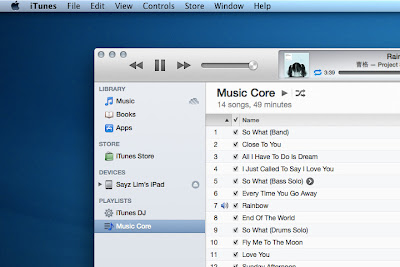

Bring up the Sidebar


Sidebar is a relic of the iTunes 10 and prior to abandonment (also called relics). If you still want the sidebar back in iTunes 11, then do I just press Command + Option + S or choose View> Show Sidebar from the menu bar.
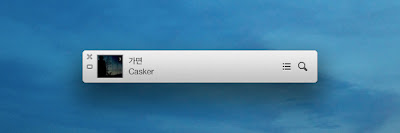
Bring up MiniPlayer  


There are 2 ways to bring MiniPlayer:
 
The first is to change the look of iTunes into MiniPlayer by selecting the button in the upper right (Command + Option + M).

 The second is to raise MiniPlayer alongside iTunes by selecting Window> MiniPlayer or press (Command + Option +3). 

Switching Between Media


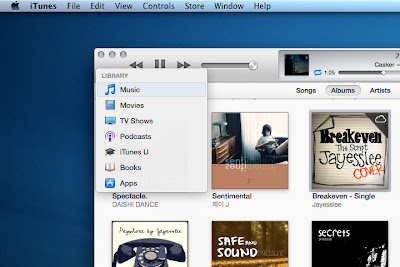
Without enable the sidebar, switching between media will require a lot of clicks. Therefore, the iTunes 11 provides a shortcut to switch between media that is Command + [1-7] in the following order: Music, Movies, TV Shows, Podcasts, iTunes U, Books, and Apps.


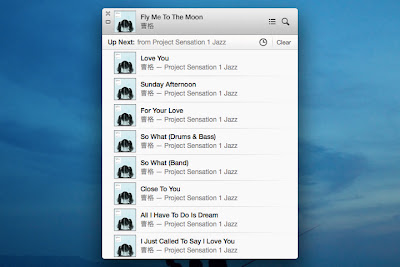
Controlling Songs By Up Next

Up Next allows you to add songs to the play list without overwriting the songs being played. Say youre playing the playlist Classical, and suddenly want to listen to another song. Simply add the songs to Up Next and when they finish playing, Classical playlist will play again. 


You can bring up Next by pressing Command + Option + U either in iTunes or in a state MiniPlayer. Then, to add songs to Up Next in several ways, namely:
  • Drag and Drop one or more songs to the panel Up Next at the top center.
  • Through action arrow and select Play Next or Add to Up Next. You can also choose the plus button that can be displayed by holding Option.
  • Use a shortcut to add songs to the list. Select the desired song from the list and press Option + Return. 

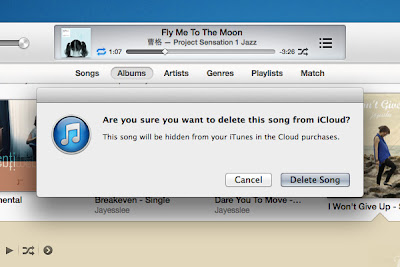
Hiding Media iCloud


If you are shopping at the iTunes Store, especially those abroad, the iTunes library you must be filled with songs iCloud. All that can be downloaded or played directly from within iTunes. What about the song that does not want to appear? You hide them.

  • The simplest way is to hide everything after you download the songs you want. Choose View> Hide Music in the Cloud.
  • Another way is to hide the songs one by one. This step is useful if you want to retain some of the songs in the library but do not want to download it. Choose a song that has the symbol of the clouds, and then delete to hide it from the libray.
Note: Restoring the song that has been hidden can be done through the iTunes Store> Accounts> View Hidden Purchases.

Such tips that need to be mastered to start using iTunes 11. And the last trick that I often use is Command + L to move to the song being played. Please try.

Monday, September 16, 2013

0 Comments
Posted in Arrangement, Art, Business

Nokia Asha 302 review The Business QWERTY

The Nokia Asha 302 comes between the Asha 300 and the Asha 303 in Nokias updated featurephone lineup, but it doesnt quite follow the numerical order. Although obviously not a smartphone, this S40 messenger is almost halfway there. It aims to bring good connectivity and more than reasonable processing power without unnecessarily complicating the interface.

Touchscreen and dual-SIM support are the two extremes in the Asha lineup but the Nokia Asha 302 sticks to the middle, finding balance and confidence in robust functionality and good build quality. Its a value package with plenty to offer to many potential upgraders looking to replace their S30 or S40 phones.

The Asha 302 is compatible with any GSM network worldwide and features both 3G and Wi-Fi connectivity. It makes sure your email, Facebook and Twitter accounts are never more than just a click away. Thats where the QWERTY keyboard is most welcome too. On the outside, a side-mounted memory card slot and metal accents make the best out of a classic messenger design. Heres what goes on inside.

Key features

Quad-band GSM/GPRS/EDGE support
Penta-band 3G with 14Mbps HSDPA and 5.76Mbps HSUPA
Asha S40 platform
Four-row hardware QWERTY keyborad
2.4" QVGA 256K-color TFT display
1GHz processor
128MB RAM, 256MB ROM
3 megapixel fixed-focus camera
VGA video recording at 15fps
Wi-Fi b/g/n
Stereo FM radio with RDS
Bluetooth v2.1 (with A2DP)
Standard microUSB port (charging enabled)
USB On-The-Go support
microSD card slot (32 GB supported, 2GB included)
3.5mm audio jack
Main disadvantages

No multitasking
Fixed-focus camera
No smart dialing
No video-call camera
No document viewer
So, the Nokia Asha 302 is raising the stakes in the low-cost telephony but makes sure it doesnt get into fights it cannot win. Halfway between a Nokia C3 and an E63, it looks on the safe side of the line. We cannot think of a better example to follow than the immensely popular Nokia C3 but it should be aware of the potential pressure of affordable smartphones - Symbian and Android alike.

Monday, September 9, 2013

0 Comments
Posted in Arrangement, Art, Business

The trial lasted for Apple Samsung showed prototypes of new iPhone

As we already know about the patent dispute between Samsung and Apple are still ongoing and increasingly bitter. Here Samsung cell phone manuals find information on the continuation of the feud is that our reports from the website theverge.com via GSM Arena blog. Heres the news:

The second day of the Apple vs. Samsung trial went interesting to say the least. After the court denied Samsung the right to make an argument that a Sony concept was the real inspiration behind iPhones design, the Koreans decided to take matters into their own hands and released the evidence, which has been previously dismissed by the court.

Samsung-Apple design


The evidence in question consists of twelve slides showing that Samsung couldnt have possibly ripped Apple off as theyve been working on devices like it months before iPhones launch. Such device is the companys F700, among others. However, Judge Lucy Koh has had enough of that and got really irritated with Samsungs actions. She even asked John Quinn, Samsungs lead attorney, to write a declaration explaining his role in releasing the excluded evidence to the press.

Judge Koh had already rejected the evidence multiple times. She noted that "Samsung has filed like 10 motions for reconsideration," and even threatened Quinn with personal sanctioning. This came after reportedly, he literally begged the court to reconsider its decision about the evidence in question.

Back to the trial at hand, it became clear that Samsungs position in all this is that they did not copy the iPhone and that even though they may have used some tech patented by Apple (the touchscreen), it is Apple that is infringing on much more important patents held by Samsung (3G stuff).

Charles Verhoeven, Samsungs attorney, stated Apple did not invent the rectangular design with rounded corners (hence the leak of the discarded evidence): "Samsung is not some copyist, some Johnny come lately doing knockoffs," he added. Verhoeven also went through Apples list of patents and tossed them aside one by one citing reasons why they should be excluded.

Christopher Stringer, Apples veteran designer since 1995, was first to take the stand as the companys witness. As he went on with his testimony, he revealed a lot of the early iPhone and iPad prototype designs. Additionally, Stringer stated that Apple has been "ripped off". "Its a huge leap in imagination to come up with something new. Thats what we did," added the veteran Apple designer.

Fortunately, TheVerge.com got hold of those prototypes images. Check out some of them below, and well let you be the judge if they resemble anything familiar.

Samsung-Apple design

The trial continues today with the testimonies of Phil Schiller, Apples Senior Vice President of Worldwide Marketing, and Scott Forstall, Apples Senior Vice President of iOS Software starting at 9AM Pacific time.

Thursday, August 15, 2013

0 Comments
Posted in Arrangement, Art, Business

Now you can choose an iPhone carrier with the Apple Store app

The new Apple Store app lets U.S. iPhone buyers choose their carrier.

Apple has updated the app to let users choose which carrier they want when buying an iPhone and to directly change their billing and shipping information.
The new Apple Store app lets U.S. iPhone buyers choose their carrier.
(Credit: Screenshot by Lance Whitney/CNET)
Apple customers who buy products through the iOS Apple Store app will find a couple of helpful updates in the latest release.
Launched yesterday, version 2.1 of the Apple Store app now lets U.S. buyers of a new iPhone choose a plan from among all three carriers--Verizon, AT&T, or Sprint.
Users can also manage their accounts directly through the app. You can now update both your billing and shipping information without leaving the app, a process that previously required you to log into the Apple Web site.
And to kick off this weeks opening of a new Apple retail store in Amsterdam, (English translation) the app itself is now available for users in the Netherlands.
The last update to the app in November added a couple of major improvements, including the ability to pick up items ordered online at your local Apple Store and pay for items in the store via your iPhone.
The latest version of the app requires iOS 4.3.3 or higher. The app is compatible with the iPhone, iPod Touch, and iPad, though Apple has yet to create an iPad-specific version.

Wednesday, May 29, 2013

0 Comments
Posted in Arrangement, Art, Business

G Plus G110 Destroyer Dual SIMG plus and has the ability to hold water

G-Plus G110 Destroyer, Dual SIMG-plus and has the ability to hold water | Price and Specification | G-plus G110 Destroyer resilient and have the ability to hold water. The concept design is not much different from Sonim phones. The phone is perfect for fans of outdoor activities such as mountain climbing, off-road racer, traveler, and so on.

G-plus G110 Destroyer is coated material combinations plus rubber and hard plastic casing that has a special grip for comfort when gripped. G-110 Destroyer plus also includes MP3 player, video player, FM radio and 1.5 megapixel camera provides power plus the ability to record video. Destroyer G110 G-plus also features an internet browser with GPRS data. The mobile phone supports Dual SIM GSM capability is equipped Dual Standby Bluetooth and USB data cable port. G-plus G110 Destroyer also rely capacity 1700 mAh lithium battery.


Specifications G-plus G110 Destroyer:

  • Network: Triband GSM (900/1800/1900 MHz)
  • Dual SIM
  • Screen: Color TFT
  • Transfer data: GPRS
  • External Memory: microSD
  • Camera: 1.5 megapixel camera, video recorder
  • Messaging: SMS, MMS
  • Connectivity: Bluetooth, cable USB data
  • Browser: WAP
  • Features: MP3/MP4 player, FM radio, Torch (flashlight), Calendar, calkulator, Alarm, Speakerphone; Battery: Lithium ion 1700 mAh
Price around U.S. $60.
0 Comments
Posted in Arrangement, Art, Business

Samsung Galaxy SIII Review The King of the GALAXYs

Samsung have spared no effort to protect the Galaxy S III against any odds. What we get as a result is the most amazing blend of performance and features we are likely to see this year.


Samsung Galaxy S III official shots
The Koreans took their time with the new flagship, giving the predecessor a full year at the helm. But they were taking no chances and theyve got the spec sheet to prove it. With most of the hardware made by Samsung themselves, the Galaxy S III is an endless list of mind-blowing numbers. The quad-core beast packs a 720p Super AMOLED screen and a massive battery, but keeps its slim waistline.


Key features:


Quad-band GSM and quad-band 3G support
21 Mbps HSDPA and 5.76 Mbps HSUPA support
4.8" 16M-color Super AMOLED capacitive touchscreen of HD (720 x 1280 pixel) resolution; Corning Gorilla Glass 2
Android OS v4.0.4 with TouchWiz launcher
1.4 GHz quad-core Cortex-A9 CPU, Mali-400MP GPU, Exynos 4 Quad chipset, 1GB of RAM
8 MP wide-angle lens autofocus camera with LED flash, face, smile and blink detection
1080p HD video recording at 30fps
Dual-band Wi-Fi 802.11 b, g, n
GPS with A-GPS connectivity; GLONASS support, Digital compass
16/32/64GB internal storage, microSD slot
Accelerometer, gyroscope and proximity sensor
Standard 3.5 mm audio jack
microUSB port with USB host and TV-out (1080p) support, MHL, charging
Stereo Bluetooth v4.0
FM radio with RDS
Great audio quality
Super slim at only 8.6mm
2MP secondary video-call camera
Full Flash for the web browser
NFC support
Document editor
File manager comes preinstalled
Extremely rich video and audio codec support
Impressively large 2100 mAh battery


Main disadvantages:


All-plastic body of dubious aesthetics
No dedicated camera key
microSIM slot
S Voice is hardly as functional as ads might make you believe


A long list of assets and a rather short list of cons speak volumes about the amount of effort that went into building the Samsung I9300 Galaxy S III. Were they just trying to improve each and every aspect of the user experience over the Galaxy S II, or was creating the ultimate droid their goal all along? The more we think about it, the more it looks the same.


The Samsung I9300 Galaxy S III at ours


Samsung are in a way raising their own bar yet again. But the competition hasnt been idle either. Weve seen proof already that the Galaxy S III is a smartphone that thrives on a challenge. It now has the stage all to itself. You could call it a curtain call if the story of the Galaxy S III wasnt just about to begin. The Samsung Galaxy SIII is priced at about $750


Conclusion


This a really good phone. It has good features, a good camera and the latest Android software.But, there are some downsides like no dedicated camera key and microSIM slot. But, still, its the flagship of Samsung in the category of mobile phones. If you dont like the SIII and its price, there are some other bettechoices.


Samsung Galaxy Note is one. It has an 8MP Camera, a stylus pen (S Pen) for S Memo, a bigger screen compared to the SIII (5.3 inch Super AMOLED screen),and its slightly cheaper than the SIII ($700)


iPhone 4S is another one. It also has an 8MP Camera, their personal voice assistant Siri, smaller screen than the SIII, and a higher price ($800).


And lastly, the Nokia Lumia 900, a high competitor to Samsungs flagship. It also has and 8MP Camera, Windows Phone 7.5, a slightly smaller screen than the SIII (4.3 inch screen), and an identical price.


So, whats your style! XD


Source: GSMArena.com

    Total Pageviews