Showing posts with label asus. Show all posts

Tuesday, September 10, 2013

0 Comments
Posted in Arrangement, Art, Business

Asus Padfone 2 PDF Manual

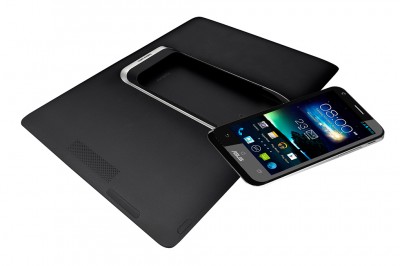
Asus Padfone 2 Performance 2 comes with new and brought the super IPS + LCD screen of 4.7 inches with resolution of 720 × 1280 pixels which produces captivating images. The screen is 4.7 inch corning glass using technology that protects from scratches with sharp images and accurate. To produce a competent performance Padfone 2 powered by Android v4.0 ICS and quad-core processor 1.5 GHz
Asus Padfone 2
Google Images
Additionally Padfone 2 also equipped with 2GB of RAM that provides convenience in connectivity. Equipped also with a 13MP camera with a resolution of 4032 × 3224 pixels and equipped with LED flash as well as a series of settings. The picture quality from ASUS is very satisfying because it is very sharp and classy.

Specifications Asus Padfone 2
  • Dimensions: 138x69x9mm
  • Weight: 135gram
  • Battery: Li-Po 2140 mAh
  • Screen: 4.7-inch, Super IPS + LCD, capacitive touchscreen, 720x1280piksel
  • RAM: 2GB
  • Memory: 16/32/64GB
  • OS: Android v4.0 ICS
  • Processor: Quad-core 1.5 GHz Krait, Qualcomm MDM215m/APQ8064
  • Camera: 13MP, Geo-tagging, 4032x3224piksel, autofocus, LED flash, touch focus
  • Secondary Camera: 1.2 MP
  • Video: 1080p @ 30fps
  • Network: GSM 850/900/1800/1900, HSDPA, LTE
  • Data Transfer: DC-HSDPA, 42 Mbps, HSDPA, 21 Mbps, HSUPA, 5.76 Mbps, LTE, 100 Mbps
  • Connectivity: Wi-Fi hotspot, Wi-Fi 802.11 a / b / g / n, dual-band, Bluetooth v4.0 with AZDP, microUSB v2.0, NFC
  • Other Features: Corning Gorilla Glass, TV-out, A-GPS, SNS Integration, ASUS Webstorage (50 GB Storage), MP3/WAV/eAAC + player, MP4/H.264/H.263
For media music Padfone 2 also equipped with Asus SonicMaster technology and audio tuning by waves. Various features are also embedded in such Asus: Asus WebStorage, A-GPS, SNS Integration, TV-out, eAAC + player. Asus is also supported by the mobile data provide super fast browsing and donwload. To support its performance to be more powerful equipped with Li-Po 2140mAh.

Here you are the User Guide PDF Manual Copy / for Asus Padfone 2  irectly from ASUS official website. Asus Padfone 2  user guide in English, Download from the Links below

[Download Asus Padfone 2  User Manual Guide]

Thursday, May 30, 2013

0 Comments
Posted in Arrangement, Art, Business

Asus Fonepad And Specification

Asus Fonepad And Specification | Asus re-issued the latest products by introducing Asus Fonepad. Asus Fonepad tablet comes with a style that has a size of 7 inches and has a resolution up to 800 x 1280 pixels, and also added density to 216ppi which uses IPS LCD display 16 million colors. By design, the Asus Fonepad has a simple design and a full touchscreen. There is also a camera that you can use for video call. The colors are captivating, adding an elegant impression on this Fonepad Asus tablet.

Asus gives some good specs include an Intel Atom Asus gives Z2420 has a speed of 1.2GHz and 1GB of RAM is supported on the phone. Not only that, the interface is used also have Jelly Bean, the latest of the Android operating system. With a combination like this, arguably Fonepad Asus tablet is quite classy. You are able to enjoy up to surf 3G/HSDPA speeds up to 21Mbps. In addition, Asus also embed Wi-Fi you can use in hotspots like Cafe or the Mall area. Asus Fonepad has two cameras on the back side and front side. On the back side, the main camera, Asus gives 3.15MP camera class. In this camera, has a pretty nice features, one of which is capable of recording video at 720p quality. In addition, there is a front camera with 1.2MP quality that you can use video call, or take pictures. Asus Fonepad have two versions to choose from, Both versions, which differ only in the internal memory. You can choose the Asus Fonepad the 8GB version or the 16GB Asus Fonepad. But both have different prices.


Specifications Asus Fonepad

  • Dimensions: 196.4 x 120.1 x 10.4 mm
  • Weight: 340 g
  • Display: 800 x 1280 pixels, 7.0 inches (~ 216 ppi pixel density)
  • Color display: IPS LCD capacitive touchscreen, 16M colors
  • Hp Color: Titanium Gray, Champagne Gold
  • Ringtones Type: MP3 ringtones
  • Internal Memory: 16 GB
  • MicroSD slot: yes, up to 32 GB
  • RAM: 1 GB
  • Connection: GPRS, EDGE, HSDPA 21 Mbps, HSUPA 5.76 Mbps, Wi-Fi 802.11 b / g / n, Wi-Fi hotspot, Bluetooth v3.0 with A2DP, microUSB v2.0
  • OS: Android OS, v4.1 (Jelly Bean)
  • Processor: Intel Atom Z2420, 1.2 GHz, PowerVR SGX540
  • Message: SMS (threaded view), MMS, Email, Push Email, IM
  • Browser: HTML5
  • Main Camera: 3.15 MP, 2048 × 1536 pixels, autofocus (selected markets only), Geo-tagging, Video 720p The second camera: 1.2 MP
  • GPS: with A-GPS support and GLONASS
  • Java: via Java MIDP emulator
  • Other Features: SNS integration, Active noise cancellation with dedicated mic, MP3/WAV/eAAC + player, MP4/H.264/H.263 player, Organizer, Document viewer, Photo viewer / editor, Voice memo / dial, Predictive text input (Swype)
  • Battery Type: Non-removable Li-Ion 4270 mAh battery (16 Wh) Talk / Active: 9 hours

Tuesday, April 9, 2013

0 Comments
Posted in Arrangement, Art, Business

GOOGLE NEXUS 7 MANUAL Asus Nexus Tablet User Guide

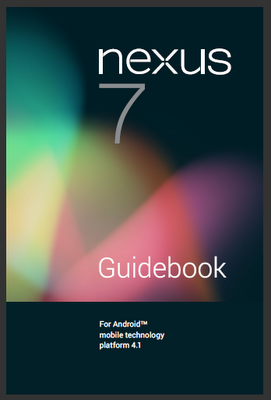
Google Nexus 7 Manual | The Google Nexus 7 manual or user guide now available for download in PDF format. The Asus or Google Nexus 7 tablet manual also known as Nexus 7 ebook guide that contain many reference information and important instruction which can help owner of this tablet. The Asus Nexus Tablet User Guide has 84 pages, with file size of 10.1 MB and support in english language. In the Google Nexus 7 owner manual you can find information such as about tutorial turn on and sign in, charge the battery, use a Google account, Jelly Ban tips, using home screen on page 7, About Google now, touch and type, also face an unlock on page 15.

Google / Asus Nexus 7 Tablet Manual Cover
Moreover in the Google Nexus 7 user manual also provide detail information about Google play, manage download, using apps and Gmail, find people, celndar, sound settings and change the wallpaper on page 25. Another tutorial about Google now cards, tips and trick, search settings, pruvacy, memory and data usage, use the keyboard, and connectet to Wi-fi networks, VPN settings.

Other important information about bean screen content on page 63, bluetooth device, connect to a windows and macintosh via USB, change back up and reset, screen lock guide, set up tablet, and many more.  While for table of content as follows:
  • 1. Get started
  • 2. Play & explore
  • 3. Make yourself at home
  • 4. Make Search personal
  • 5. Tune performance
  • 6. Enter & edit text
  • 7. Connect to networks
  • 8. Connect to devices
  • 9. Manage accounts
  • 10. Secure your tablet
  • 11. Accessibility
Get and download free pdf  for the Google / Asus Nexus 7 tablet manual user guide
here

    Total Pageviews